ezxmldsig for Node.js - v2.0.0
ezxmldsig for Node.js: signed and encrypted XML tokens, and sealed files
Documentation: webcoder31.github.io/ezxmldsig-doc
Why ezxmldsig exists, how a token works, a single sign-on, the duties of the receiver, encryption, certificates and keys, interoperability: the concepts of the tokens common to the Node.js and PHP libraries are explained there. The structure of the seals and the rules they follow are in their design document. The terms of the tokens and of the seals (CA, canonicalization, replay, XAdES, ASiC-E, levels B, T and LT, CRL, OCSP…) are defined in the glossary of the documentation site. This README covers what is particular to the Node.js library.
The library ezxmldsig creates and verifies XML tokens: enveloping XML digital signatures that carry timestamped user data, optionally encrypted. Use them for token based authentication, single sign-on, or to transmit data whose integrity and origin, and confidentiality when they are encrypted, are protected by the token itself. It also seals files, as an experimental feature: an ASiC-E container that holds the files and one XAdES signature over them proves who sealed them and that they have not changed since (see Seals).
It is the Node.js counterpart of the PHP library ezxmldsig, version 2.1.0: both create and verify the same tokens and the same seals, so that a single sign-on can mix PHP and Node.js nodes. A token created by one is valid for the other, which reads the same data, and both refuse the same forged tokens with the same errors; each library verifies the seals of the other (see Interoperability and Compatible versions). The classes, their methods, the options and the error messages are those of the PHP library, adapted to JavaScript; the differences are listed in Differences with the PHP library.
A token signs its own content only: the library does not sign existing XML documents in place, nor parts of them; for these, use xml-crypto directly. Files of any kind are signed by the seals, in a container that holds them: to sign a PDF inside the PDF itself, use a PAdES library.
The author of the ezxmldsig library is Thierry Thiers.
Contents
- Requirements
- Installation
- What's in the box?
- Why?
- How does it work?
- How to use?
- Demos
- Differences with the PHP library
- Tests
- Documentation
- Releasing a version
- Security
- License
- How to Contribute?
Requirements
Node.js 22.12 or later. The library is an ES module; CommonJS code can load it with require(), which Node.js supports for ES modules from version 22.12.
Its dependencies: xml-crypto for the canonicalization of XML, @xmldom/xmldom to parse it, and xpath to query it. Cryptography (digests, signatures, encryption, certificates) is done by node:crypto, that is OpenSSL.
Installation
npm install @webcoder31/ezxmldsig
What's in the box?
The package has three branches, each imported from its own path:
@webcoder31/ezxmldsig/token:XMLDSigToken, the signed and encrypted XML tokens, and the identifiers of the algorithms of XML Encryption;@webcoder31/ezxmldsig/core: what the tokens and the seals share,X509Certand the identifiers of the algorithms of XML Signature;@webcoder31/ezxmldsig/seal: experimental, seals of files (detached XAdES signatures in an ASiC-E container, at levels B, T and LT); its API may change in a minor version. Its design is in design/seal.md.
The package has no root: import … from '@webcoder31/ezxmldsig' fails, and the files of dist/ cannot be imported by their path.
XMLDSigToken creates and analyzes XML tokens:
- It builds a token from user data (named values, nested at will) and reads them back the same way.
- It lets you choose the algorithms of the signature (see Options). By default: inclusive canonicalization (http://www.w3.org/TR/2001/REC-xml-c14n-20010315), RSA-SHA256 and an SHA-256 digest; the values of the data are encoded in base64.
- It encrypts and decrypts the token data, so that only the recipient can read them, even when the token travels over an unencrypted connection: AES-256-GCM for the data and RSA-OAEP for the session key by default. Only the token data are encrypted: this protects neither the rest of the request nor the response, does not authenticate the server, and does not prevent an intercepted token from being submitted again (see Replay).
- It guarantees the integrity and the origin of the data by verifying that the signature has the structure of a token, that its algorithms are the expected ones, that the token has not been altered, and that the X.509 certificate of the token is trusted (see Trust anchor).
- Each token holds a signed timestamp and a signed random identifier, so that the receiver can refuse a token that is too old or already accepted (see Replay). These two checks are up to the receiver:
isSignatureValid()makes neither. - It gives access to the information of the certificate of the token: subject, issuer, validity dates.
getPrettyXML()gives the token in a readable form, for display, as the PHP library gives it. - It refuses, before parsing them, the XML documents that have a document type declaration (see XML parsing).
X509Cert reads an X.509 certificate (subject, issuer, Distinguished Name, validity dates, fingerprint) and makes the checks the analysis needs: its key usage (canSign()), its chain up to trusted CA certificates (isTrustedBy()), whether a given CA certificate issued it (isValidCA()). For the seals, getTrustedChain() builds and verifies the chain at a given date, the time of a time-stamp, with the rules isTrustedBy() applies at the current date.
createSeal() and verifySeal() seal files and verify seals: an ASiC-E container (ETSI EN 319 162-1) that holds the files and one detached XAdES baseline signature over them (ETSI EN 319 132-1), at level B, T (a signature time-stamp, RFC 3161) or LT (the certificates, CRLs and OCSP responses that validate it, embedded). The PHP library makes and verifies the same seals, and DSS, the validator of the European Commission, validates them.
The token protects its own content only: not the request that carries it (URL, headers, other fields), nor the response, nor the identity of the server it is sent to. Use an HTTPS connection for these.
Why?
A signature proves that the data of a token were not changed; what matters most is to prove who issued it. A receiver accepts a token only if its signing certificate descends, through a chain of trust, from the CA certificates it declares and, when it asks for it, has the subject it expects or is the very certificate it pinned (see Trust anchor).
The tokens do not check revocation: for them, the library consults neither certificate revocation lists (CRL) nor OCSP responders, so a revoked certificate is accepted until it expires. The seals check it (see Seals). What to do when a key leaks, signing key, CA key or decryption key: see When a key is compromised on the documentation site.
The chain of trust, a root of a company's own for an internal single sign-on, and why this library exists: see Why? on the documentation site.
How does it work?
A token is an enveloping XML digital signature: the node Token holds the user data, a timestamp and a random identifier; its digest is written in ds:SignedInfo, which the sender signs with its private key; its certificate travels in ds:KeyInfo. The receiver answers three questions: were the data changed (the digest), is the seal intact (the signature), and who sealed it (the trust in the certificate). The last one decides: an attacker who alters the data and signs them again with a key of their own passes the first two.
isSignatureValid() also checks the algorithms and the audience; the freshness, the expiry and the replay are up to the receiver (see Checking an XML token).
A token block by block, each check and the attack it stops: see How does it work? on the documentation site. The demos play these checks out on real tokens, and replay the attacks the library rejects.
How to use?
Keys and certificates are in PEM format, given by the path of their file or by their content (a string holding -----BEGIN , or bytes). The certificates of the examples are those of test/fixtures/demo-certs/, whose private keys are public: generate your own (see Certificates and keys).
Creating a signed XML token
import { XMLDSigToken } from '@webcoder31/ezxmldsig/token';
const data = {
name: 'Ragnar Lothbrok',
role: 'Jarl',
location: 'Kattegat',
};
const token = XMLDSigToken.createXMLToken(
data,
'path/to/signing/private/key.pem',
'path/to/signing/certificate.pem',
'signing-key-password', // or null
);
if (token.getError() !== null) {
throw new Error(token.getError());
}
const xml = token.getXML();
The token, its long base64 values shortened to their first and last 8 characters; UmFnbmFyIExvdGhicm9r is Ragnar Lothbrok:
<?xml version="1.0"?>
<ds:Signature xmlns:ds="http://www.w3.org/2000/09/xmldsig#">
<ds:SignedInfo><ds:CanonicalizationMethod Algorithm="http://www.w3.org/TR/2001/REC-xml-c14n-20010315"/>
<ds:SignatureMethod Algorithm="http://www.w3.org/2001/04/xmldsig-more#rsa-sha256"/>
<ds:Reference URI="#Token"><ds:Transforms><ds:Transform Algorithm="http://www.w3.org/TR/2001/REC-xml-c14n-20010315"/></ds:Transforms><ds:DigestMethod Algorithm="http://www.w3.org/2001/04/xmlenc#sha256"/><ds:DigestValue>/e+XHFxf ... FsClO7o=</ds:DigestValue></ds:Reference></ds:SignedInfo><ds:SignatureValue>CmQssCX6 ... DFHjKA==</ds:SignatureValue>
<ds:KeyInfo><ds:X509Data><ds:X509Certificate>MIIFMTCC ... tV4guQ==</ds:X509Certificate></ds:X509Data></ds:KeyInfo><ds:Object Id="Token"><Token><TokenTimestamp>2026-10-21T22:40:11Z</TokenTimestamp><TokenId>34fbad1e3310d5c8ff46d770c3297cc3</TokenId><TokenData><name Algorithm="base64">UmFnbmFyIExvdGhicm9r</name><role Algorithm="base64">SmFybA==</role><location Algorithm="base64">S2F0dGVnYXQ=</location></TokenData></Token></ds:Object></ds:Signature>
This is, byte for byte but for the values, the token the PHP library writes.
A value is a string, a number, a boolean, null, bytes (a Uint8Array) or nested values. An analysis reads every value back as a string (true as '1', numbers as written by String()), or as a Buffer when its bytes are not UTF-8 text. As with the PHP library, a value written empty ('', false, null, empty bytes or empty nested values) is not read back. A name must be an XML name: '1st' or a key of an array gives the error Invalid Character Error.
Creating a signed XML token with encrypted user data
The token is encrypted for the recipient, with its encryption certificate: only the private key of this certificate, which the recipient keeps, can decrypt the data.
const token = XMLDSigToken.createSecureXMLToken(
data,
'path/to/signing/private/key.pem',
'path/to/signing/certificate.pem',
null, // the private key of the recipient: not needed
'path/to/recipient/encryption/certificate.pem',
'signing-key-password', // or null
);
The sender does not need the private key of the recipient: pass null instead. The created token is then checked right away up to its decryption (structure, algorithms, digest, signature, trust in the signing certificate): isSignatureValid() and isDataEncrypted() return true, while getData(), getTimestamp(), getTokenId(), getAudience() and getExpiry() return null, as they are inside the encrypted content. When the sender does hold this key (for instance, when it encrypts tokens for itself), it can pass it, with its password as seventh parameter: the created token is then also decrypted and its content checked.
The data, the timestamp, the identifier, the audiences and the expiry of the token are encrypted: the node xenc:EncryptedData replaces the node Token.
Checking an XML token
The analysis requires a trust anchor (see Trust anchor): without it, no token is valid.
isSignatureValid() checks neither the freshness of the token nor whether it is replayed. A token that was valid once stays valid for it, however old it is and however many times it is submitted. Before trusting the data of a received token, the receiver must make three checks:
isSignatureValid()returnstrue: structure, algorithms, digest, signature, trust in the signing certificate, and audience when the token names one (see Audience and expiry);isOutOfDate(ttl)returnsfalse, for the time to live the application accepts, and the expiry of the token if it has one (freshness);- the identifier returned by
getTokenId()has not been accepted before: store it atomically, and refuse the token if it already is (see Replay).
Restrict the trust anchor to the sender. caCertPath accepts any certificate its CA issues. As soon as this CA also issues certificates to others than the expected sender, any of them can sign a token that isSignatureValid() accepts: add expectedSubject (the subject of the certificate of the sender), or pin the certificate of the sender with signerCertPath.
import { XMLDSigToken } from '@webcoder31/ezxmldsig/token';
const ttl = 120;
const token = XMLDSigToken.analyzeSecureXMLToken(
xml,
'path/to/decryption/private/key.pem', // the private key of this recipient
'decryption-key-password', // or null
{
// Trust anchor (required): the CA that issued the signing certificate
// of the sender, and the certificates up to its root, restricted to the
// sender by the subject of its certificate.
caCertPath: ['path/to/ca/intermediate/certificate.pem', 'path/to/ca/root/certificate.pem'],
expectedSubject: { O: 'Lothbrok Ltd', OU: 'Signature Dept' },
},
);
// An unencrypted token can be analyzed this way too; without a decryption
// key, use XMLDSigToken.analyzeXMLToken(xml, options).
// Check 1 of 3: the token is valid. The error may quote what the token
// holds: escape it wherever it is shown.
if (!token.isSignatureValid()) {
throw new Error(`Invalid XML token: ${token.getError()}`);
}
// Check 2 of 3: the token was issued less than 2 minutes ago, and its
// expiry, if any, is not passed.
if (token.isOutOfDate(ttl)) {
throw new Error('Token is out of date!');
}
// Check 3 of 3: the token was not accepted before. replayStore is a store
// shared by all the servers that receive the tokens, whose add() stores an
// identifier atomically and tells whether it was new (SET NX in Redis, a
// unique key in a database...).
if (!(await replayStore.add(token.getTokenId(), ttl + XMLDSigToken.DESYNC_TOLERANCE))) {
throw new Error('Token already used!');
}
// All is fine: the data can be trusted. They are data, to be escaped
// wherever they are shown.
const data = token.getData();
An option that is refused (unknown, out of its context, of the wrong type, or naming a file that cannot be read) throws. A token that is not valid does not throw: isSignatureValid() returns false, getError() tells why, and getAnomalies() lists the anomalies found.
The API is synchronous: creating or analyzing a token does not wait for anything but the computer.
Replay
A valid token can be submitted again, by whoever intercepted it, for as long as isOutOfDate() accepts it. The library keeps no list of the tokens it has analyzed: refusing a token already accepted is up to the receiver.
Each token holds an identifier of 128 random bits, written in hexadecimal in the node Token/TokenId and covered by the signature: altering it invalidates the token. getTokenId() returns it (32 hexadecimal characters) for a valid token only, and null otherwise. The receiver must:
- store the identifier of each token it accepts, atomically with the check that it is not stored yet, in a store shared by all the servers that receive the tokens;
- refuse a token whose identifier is already stored;
- keep each identifier at least as long as the token can be accepted.
isOutOfDate(ttl)accepts a token fromXMLDSigToken.DESYNC_TOLERANCEseconds (30) before its timestamp tottlseconds after it: keep the identifierttl + XMLDSigToken.DESYNC_TOLERANCEseconds after accepting the token.
A token without identifier is rejected (Token identifier is missing!): the receiver could not tell it from a replayed one. So is a token whose identifier is not 32 lowercase hexadecimal characters (Token identifier is malformed!).
Why a receiver must check freshness, expiry, replay and audience, and the mistakes to avoid when storing the identifiers: see The receiver's duties on the documentation site.
Audience and expiry
A token signed by a trusted issuer is valid for every receiver that trusts this issuer: a token issued for one application is accepted by another one, unless the token says who it is addressed to. Two creation options, both covered by the signature, address this, with the matching checks at analysis.
Audience. The option audience (a string, or a list of strings) names the receivers the token is addressed to: application names, URLs, any value the issuer and each receiver agree on. Each receiver gives its own with expectedAudience, and isSignatureValid() checks it:
| Token | expectedAudience given |
expectedAudience not given |
|---|---|---|
| Names audiences | Valid only if one of them is expectedAudience (compared as is, case included) |
Rejected: a receiver that does not say who it is cannot accept a token addressed to someone |
| Names no audience | Rejected: the receiver asked for a token addressed to it | Valid |
// The issuer addresses the token to the application "crm"...
const token = XMLDSigToken.createXMLToken(data, signKey, signCert, signKeyPassword, {
audience: 'crm',
validity: 60,
});
// ...which accepts it, while the application "mail" rejects it.
const analyzed = XMLDSigToken.analyzeXMLToken(xml, {
caCertPath: ['path/to/ca/intermediate/certificate.pem', 'path/to/ca/root/certificate.pem'],
expectedAudience: 'crm',
});
A rejected token gives the reason in getError(), e.g. Token is not addressed to the expected audience! Expected: 'mail'. Token audience: 'crm'., and its data are not read. getAudience() returns the audiences of a valid token, null otherwise. An audience is a non-empty string, without surrounding spaces or control characters: an option that breaks these rules throws.
Expiry. The option validity (a number of seconds) writes in the token the date after which it is out of date. isOutOfDate(ttl) then rejects the token once this date is passed, whatever ttl: the shorter of the validity set by the issuer and the time to live set by the receiver applies. Like the time to live, the expiry is a check left to the caller: isSignatureValid() does not make it. getExpiry() returns the expiry of a valid token (YYYY-MM-DDThh:mm:ssZ, UTC), null otherwise. A token whose expiry is malformed, repeated or not after its timestamp is not valid.
XML parsing
A document type declaration (<!DOCTYPE ...>) declares entities, which an XML parser expands where the document references them: nested entities make a small document grow to gigabytes, and external entities read local files or URLs. A token never has one: the analysis refuses any document holding <!DOCTYPE before parsing it (XML Digital Signature must not have a document type declaration (DOCTYPE)!).
This check reads the document as it is given, which only shows <!DOCTYPE as is in UTF-8, the encoding of the tokens. A document in another encoding is therefore refused too (XML Digital Signature must be encoded in UTF-8!): one that holds a NUL character (UTF-16, UTF-32) or declares another encoding. A token is given as a string, or as the bytes of its UTF-8 encoding.
The parser never accesses the network nor reads files, and any error or warning it reports refuses the document (XML Digital Signature is not a valid XML document!). As libxml does for the PHP library, a document is also refused when it holds a character XML 1.0 cannot hold, written as is or as a character reference, or when it nests elements more than 257 levels deep.
Trust anchor
The signature of a token is verified with the X.509 certificate the token carries. Anyone can sign a token with a key pair of their own and a certificate that copies the names (subject, issuer) of a legitimate one: the signature alone proves nothing. The analysis therefore requires a trust anchor, given in its options, and isSignatureValid() only returns true if the certificate of the token is trusted:
caCertPath(a PEM file or content, or a list of them): the CA certificates you trust. The chain of the signing certificate must be built and verified up to a self-signed certificate of them, as OpenSSL does for the PHP library: signature of each link, validity dates of each certificate, CA constraints and key usage of each issuer, path lengths.signerCertPath(a PEM file or content): the certificate the token must be signed with (pinning). Given alone, it is the trust anchor; given withcaCertPath, both are required.expectedSubject(an object or a string, optional): the subject the signing certificate must have. Character case is significant. It does not replacecaCertPathorsignerCertPath. Give it, orsignerCertPath, whenever the CA ofcaCertPathalso issues certificates to others than the expected sender: without it, any certificate of this CA is accepted.-
As an object, the fields to check, as returned by
getCertSubject():{ O: 'Lothbrok Ltd', OU: 'Signature Dept' }. Fields that are not given are not checked. -
As a string, the full Distinguished Name, compared as is with the one
getCertDN()returns. This is the OpenSSL "oneline" format: every field of the subject, in the order of the certificate, each written/<short name>=<value>;/and+in a value are escaped by a backslash, and a byte out of printable ASCII is written\xHH:/C=DK/ST=Jylland/L=Kattegat/O=Lothbrok Ltd/OU=Signature Dept/CN=www.lothbrok.dk/emailAddress=ivar@lothbrok.dkIt is neither the RFC 2253 form (
CN=...,O=...) nor the form printed by theopensslcommand line (C=DK, ST=...): copy it fromgetCertDN().
-
In every case, the signing certificate must be valid at the current date and, if it has a key usage extension, allow digitalSignature or nonRepudiation.
Trusting an intermediate CA. A chain must end at a self-signed root. To trust the certificates issued by an intermediate CA, give its certificate and the certificates up to its root, as several files or as one file holding them all:
const options = { caCertPath: ['path/to/intermediate.cert.pem', 'path/to/root.cert.pem'] };
With the intermediate certificate alone, every token is rejected and getError() returns:
Signing certificate is not issued by a trusted CA: its chain could not be verified up to the CA certificates of the option 'caCertPath', which must hold the issuing CA and the certificates up to its root!
Only the signing certificate is taken from the token, never intermediate certificates: a certificate issued by another intermediate CA of the same root is rejected, since its issuer is not in your files. A certificate issued directly by one of the CA certificates you give (the root included) is accepted: add expectedSubject to narrow it down to the sender. The certificates of the system are never trusted.
Without a trust anchor, isSignatureValid() returns false and getError() returns No trust anchor! Pass the option 'caCertPath' (trusted CA certificates) and/or 'signerCertPath' (pinned signing certificate) to analyze a token: without them, no signing certificate can be trusted..
isCertTrusted() tells whether the certificate passed these checks. The individual checks isCertOutOfDate(), isValidCertIssuer() and isValidCertCA() remain available, but isSignatureValid() does not need them. isValidCertIssuer() only compares names, which any certificate can copy.
When a token is created, it is analyzed right away to check it, with the certificate of its own signing key as trust anchor.
Encryption
The token data are encrypted with a session key generated for each token, and the session key is encrypted for the recipient with its encryption certificate (key transport). The encryption takes place before the signature, which therefore covers the encrypted data.
- Default algorithms. The data are encrypted with AES-256-GCM, and the session key with RSA-OAEP (http://www.w3.org/2001/04/xmlenc#rsa-oaep-mgf1p). AES-GCM checks an authentication tag before returning any data: altered data are rejected as a whole.
- Type of the encrypted data. The node
xenc:EncryptedDatareplaces the nodeTokenand declares the type http://www.w3.org/2001/04/xmlenc#Element. The analysis reads both types XML Encryption 1.1 defines for an XML plaintext,ElementandContent(the type of the tokens of the PHP library up to version 1.1), and refuses any other. The plaintext is read as an XML fragment, so that it cannot hold a document type declaration. - Decryption after verification. A token is only decrypted once its digest, its signature, the trust in its certificate and its algorithms have been verified.
- One error for every decryption failure. Whatever fails once the decryption starts (session key, data, parsing of the decrypted XML),
getError()returnsToken decryption failed!, with no reason and no anomaly. Failures that do not depend on the encrypted content keep their own message (no decryption key, a key that cannot be loaded, a malformedxenc:EncryptedData). - RSA 1.5 is refused, at creation and at analysis, and no option allows it.
- CBC is accepted only when declared. AES-CBC and Triple DES CBC have no integrity. An analysis decrypts a CBC token only if its option
sessionKeyCipheringAlgorithmnames this very algorithm, even whencheckCryptingAlgorithmsisfalse. Declare it only to read tokens of peers that cannot use AES-GCM yet.
What encryption protects and what it does not, and the attacks these choices stop (padding oracles, Bleichenbacher's attack on RSA 1.5, Jager and Somorovsky's attack on CBC): see Encryption on the documentation site.
Certificates and keys
A token involves up to three kinds of certificates, all X.509 certificates in PEM format with RSA keys: the signing certificate of the sender, the CA certificates the recipient trusts (caCertPath), and, for encrypted tokens, the encryption certificate of the recipient. EC and DSA keys are refused. These rules are those of the tokens: the seals take RSA keys of 2048 bits or more, and EC keys on P-256, P-384 and P-521 (see Seals).
The signing certificate must be valid at the current date and, if it has a key usage extension, allow digitalSignature or nonRepudiation. With caCertPath, every certificate of the chain is also checked: validity dates, signature, and, for each issuer, basic constraints with CA:TRUE and a key usage that allows keyCertSign (see Trust anchor).
expectedSubject takes the fields of the subject as an object, { O: 'Lothbrok Ltd', OU: 'Signature Dept' }, or the full Distinguished Name as a string (see Trust anchor).
Who holds which key, what is checked, the fields of a subject, and the OpenSSL commands that create a root CA, an intermediate CA, a signing and an encryption certificate: see Certificates and keys on the documentation site.
Options
Each factory takes an object of options as its last parameter. Each option applies to a context: token creation (createXMLToken(), createSecureXMLToken()), token analysis (analyzeXMLToken(), analyzeSecureXMLToken()) or both. The encryption options only apply when an encryption certificate (createSecureXMLToken()) or a decryption key (analyzeSecureXMLToken()) is given. An unknown option (a misspelt name, for instance), an option given out of its context, or an option whose value is null, undefined or invalid throws: none is ignored.
| Option | Context | Type | Default |
|---|---|---|---|
base64Encode |
creation | boolean | true |
xmldsigNsPrefix |
creation | string ('': no prefix) |
'ds' |
canonicalizationAlgorithm |
creation and analysis | string | C14N |
signatureAlgorithm |
creation and analysis | string | RSA_SHA256 |
digestAlgorithm |
creation and analysis | string | SHA256 |
checkSigningAlgorithms |
analysis | boolean | true |
caCertPath, signerCertPath, expectedSubject |
analysis | see Trust anchor | none |
audience |
creation | string or list of strings, see Audience and expiry | none |
validity |
creation | integer (seconds), see Audience and expiry | none |
expectedAudience |
analysis | string, see Audience and expiry | none |
sessionKeyCipheringAlgorithm |
encryption: creation with an encryption certificate, analysis with a decryption key | string | AES256_GCM |
cryptAlgorithm |
encryption: creation with an encryption certificate, analysis with a decryption key | string | RSA_OAEP_MGF1P |
checkCryptingAlgorithms |
analysis with a decryption key | boolean | true |
The algorithms are given with the constants of XMLDSigToken (e.g. XMLDSigToken.RSA_SHA512), also exported by the package: those of XML Signature by its core (import { RSA_SHA512 } from '@webcoder31/ezxmldsig/core'), those of XML Encryption by its tokens (import { AES256_GCM } from '@webcoder31/ezxmldsig/token'), whose values are the URIs of the XMLDSIG and XML Encryption specifications. Each algorithm option only accepts the algorithms of its own list:
canonicalizationAlgorithm:C14N,C14N_COMMENTS,EXC_C14N,EXC_C14N_COMMENTS.signatureAlgorithm:RSA_SHA1,RSA_SHA256,RSA_SHA384,RSA_SHA512.digestAlgorithm:SHA1,SHA256,SHA384,SHA512,RIPEMD160.sessionKeyCipheringAlgorithm:AES128_GCM,AES192_GCM,AES256_GCM, and the algorithms without integrityTRIPLEDES_CBC,AES128_CBC,AES192_CBC,AES256_CBC, which an analysis only accepts when this option names them (see Encryption).cryptAlgorithm:RSA_OAEP_MGF1P. RSA 1.5 is refused.
At creation, the algorithm options are the algorithms the token is built with. At analysis, they are the algorithms the token must have been built with: a token built with other algorithms is rejected, and getError() names them (Unauthorized Signature algorithm! Expected: ..., Used: ...). checkSigningAlgorithms (signature, digest, canonicalization) and checkCryptingAlgorithms (session key, key transport) set to false turn this check off; an algorithm out of the lists above is rejected all the same, and so is an undeclared CBC algorithm.
// Create a token signed with RSA-SHA512 and an SHA-512 digest...
const token = XMLDSigToken.createXMLToken(data, signKey, signCert, signKeyPassword, {
signatureAlgorithm: XMLDSigToken.RSA_SHA512,
digestAlgorithm: XMLDSigToken.SHA512,
});
// ...and analyze it, expecting these algorithms.
const analyzed = XMLDSigToken.analyzeXMLToken(xml, {
caCertPath: ['path/to/ca/intermediate/certificate.pem', 'path/to/ca/root/certificate.pem'],
signatureAlgorithm: XMLDSigToken.RSA_SHA512,
digestAlgorithm: XMLDSigToken.SHA512,
});
Seals (experimental)
A seal proves who sealed files, and that they have not changed since: contracts, PDF, text or Markdown files, any file. createSeal() writes an ASiC-E container (.asice, a ZIP archive) that holds the files, a manifest, and a XAdES signature of level B over them; verifySeal() verifies one. The seals are those of the PHP library ezxmldsig, version 2.1.0, and their design document gives the structure and the rules followed. Each library verifies the seals of the other, and DSS validates the seals of both, at levels B, T and LT.
The seals are an experimental feature of the 2.x versions: their API may change in a minor version.
import { readFileSync, writeFileSync } from 'node:fs';
import { createSeal, verifySeal } from '@webcoder31/ezxmldsig/seal';
const container = createSeal(
[
{ name: 'contract.pdf', content: readFileSync('contract.pdf') },
{ name: 'annexes/prices.csv', content: readFileSync('prices.csv') },
],
'path/to/signing/key.pem',
'path/to/signing/certificate.pem',
'key password',
{ chain: ['path/to/intermediate/ca/certificate.pem'] },
);
writeFileSync('contract.asice', container);
const verification = verifySeal(readFileSync('contract.asice'), {
caCertPath: 'path/to/root/ca/certificate.pem',
crls: [crlOfTheIntermediateCa, crlOfTheRootCa],
});
if (!verification.isValid()) {
throw new Error(verification.getError());
}
// verification.getFiles(), getSigningCertificate(), getLevel(), getSigningTime()...
- Algorithms. An RSA key signs with RSA-PSS by default (SHA-256, the salt as long as the digest), an EC key with ECDSA on P-256, P-384 or P-521; RSA PKCS#1 v1.5 remains available (
signatureAlgorithm), and accepted at verification. RSA keys of less than 2048 bits are refused, and so are SHA-1 and MD5. - Everything is covered. A seal is valid only if every file of the container outside
META-INF/is covered by its signature, so that a file added to a sealed container cannot pass for a sealed one. The container is read strictly: a ZIP archive that two readers could see differently, an element of the signature this library does not process (a signature policy, a transform), make the seal invalid. - Trust.
caCertPathnames the trusted CA certificates, as for the tokens. The signing certificate is trusted at the time of the signature time-stamp, if any, and at the current date otherwise: the time the signer claims (getSigningTime()) proves nothing. - Revocation. It is checked by default, with CRLs (
crls, in DER or PEM) or OCSP responses (ocspResponses) for each certificate of the chain, its trust anchor excepted. The library sends no request:validationDataRequests()lists the CRLs to fetch and the OCSP requests to send.revocation: falseverifies a seal without, whichisRevocationChecked()then tells. - Level T.
timestampRequest()gives the RFC 3161 request to send to a time-stamping authority of your choice (application/timestamp-query), andaddSignatureTimestamp()checks its response and embeds the token; the verification then needstsaCertPath, the trusted certificates of the authority. - Level LT.
addValidationData()embeds the certificates, CRLs and OCSP responses that validate a seal of level T, issued after its time-stamp: the seal can then be validated without reaching the CAs, as long as the certificate of the time-stamping authority is valid (it is checked at the current date: only a time-stamp over the time-stamp, level LTA, which this library does not make, would check it at an earlier one).
The names of the files are compared in Unicode normalization form C: a name that is not in this form is refused at creation.
Interoperability
With the PHP library. A token created by the PHP library ezxmldsig 1.2.1 or later is valid here, and a token created here is valid for it, signed or encrypted, with every algorithm and option both libraries share; both read the same data, timestamp, identifier, audiences and expiry. The tests of this library check it, under PHP 7.4 and 8.3, and replay the attack lab of the PHP library demo: every forged token gets the same verdict from both libraries. See Differences with the PHP library for the few cases where they differ.
Seals. The seals of both libraries are the same: each library verifies the seals of the other, at levels B, T and LT, and DSS validates them (see What is checked, and by whom).
The format of a token, and other libraries. The format of a token, element by element, and the code that creates and reads one with xml-crypto and xml-encryption, which the tests of this library run: see Interoperability on the documentation site. These libraries only verify a signature, with the key they are given, and only decrypt: a receiver that uses them directly must make all the other checks of isSignatureValid() itself.
Compatible versions
The versions of the two libraries that work together. A pair has the same features when each library creates and verifies what the other creates and verifies: the same tokens, and the same seals when both have them. In every pair, the cases listed in Differences with the PHP library differ.
| PHP library | Node.js library | Tokens | Seals | Same features |
|---|---|---|---|---|
| 2.1.0 | 2.0.0 | exchanged both ways (1) | exchanged both ways, experimental (2) | yes |
| 2.0.0 | 2.0.0 | exchanged both ways | only in the Node.js library | no |
| 1.2.1 | 1.0.3 | exchanged both ways | in neither library | yes |
| 1.2.1 | 1.0.2 | exchanged both ways | in neither library | no: getPrettyXML() comes to the Node.js library in 1.0.3 |
| 1.2.0 | 1.0.0, 1.0.1 | exchanged both ways, but for three defects of the PHP library 1.2.0, fixed in 1.2.1 (3) | in neither library | no: getPrettyXML() comes to the Node.js library in 1.0.3 |
- The tests of the Node.js library 2.0.0 exchange tokens with the PHP library 2.1.0, which does not change the tokens of 2.0.0; the tests of the PHP library 2.1.0 have its tokens analyzed by the Node.js library 2.0.0.
- The tests of each library have its seals verified by the other: those of the PHP library 2.1.0 by the Node.js library 2.0.0, and the other way round; DSS validates the seals of both (see What is checked, and by whom).
- Listed in Differences with the PHP library.
Each pair of the table is the one the tests of these versions check. The tokens do not change from the PHP library 1.2.1 and the Node.js library 1.0.2 on: later versions exchange them too, although the tests do not check every pair. A receiver of the PHP library 1.0 or 1.1 refuses the encrypted tokens of the PHP library 1.2.0 and later, and those of every version of the Node.js library.
Upgrading from 1.x
- Imports. The package has no root any more: each name comes from its branch.
import { XMLDSigToken } from '@webcoder31/ezxmldsig'becomesimport { XMLDSigToken } from '@webcoder31/ezxmldsig/token', andX509Certcomes from@webcoder31/ezxmldsig/core. The typesTokenData,TokenValue,ReadTokenDataandTokenOptionscome from@webcoder31/ezxmldsig/token,NameFieldsandPemSourcefrom@webcoder31/ezxmldsig/core. The identifiers of canonicalization, digest and signature (C14N,SHA256,RSA_SHA256…,XMLDSIG_NS) come from@webcoder31/ezxmldsig/core, those of encryption (AES256_GCM,RSA_OAEP_MGF1P…,XMLENC_NS) from@webcoder31/ezxmldsig/token. - Nothing else changes: the same options, verdicts and error messages, and the same tokens. The constants of
XMLDSigToken(XMLDSigToken.RSA_SHA512) remain.
Demos
Two demos show the tokens at work, online, with nothing to install. They run the PHP library, whose tokens this library creates and verifies the same way (see Interoperability); its README tells how to run them on your machine (signed token demo, single sign-on demo).
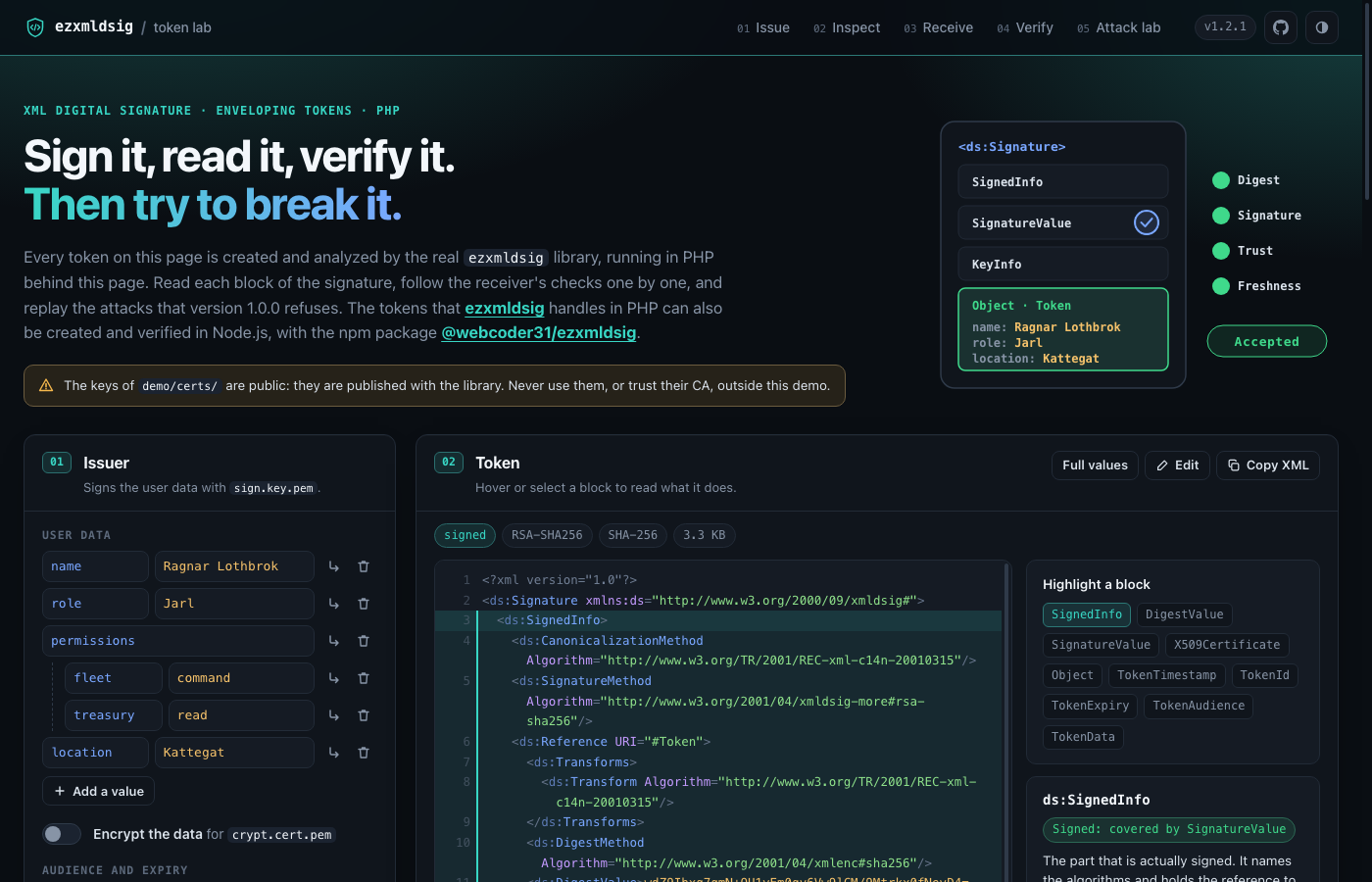
**The token lab, https://ezxmldsig.wbcdr.dev/**: create a token, read each block of its signature, follow the checks of the receiver one by one, and replay the attacks the library refuses.
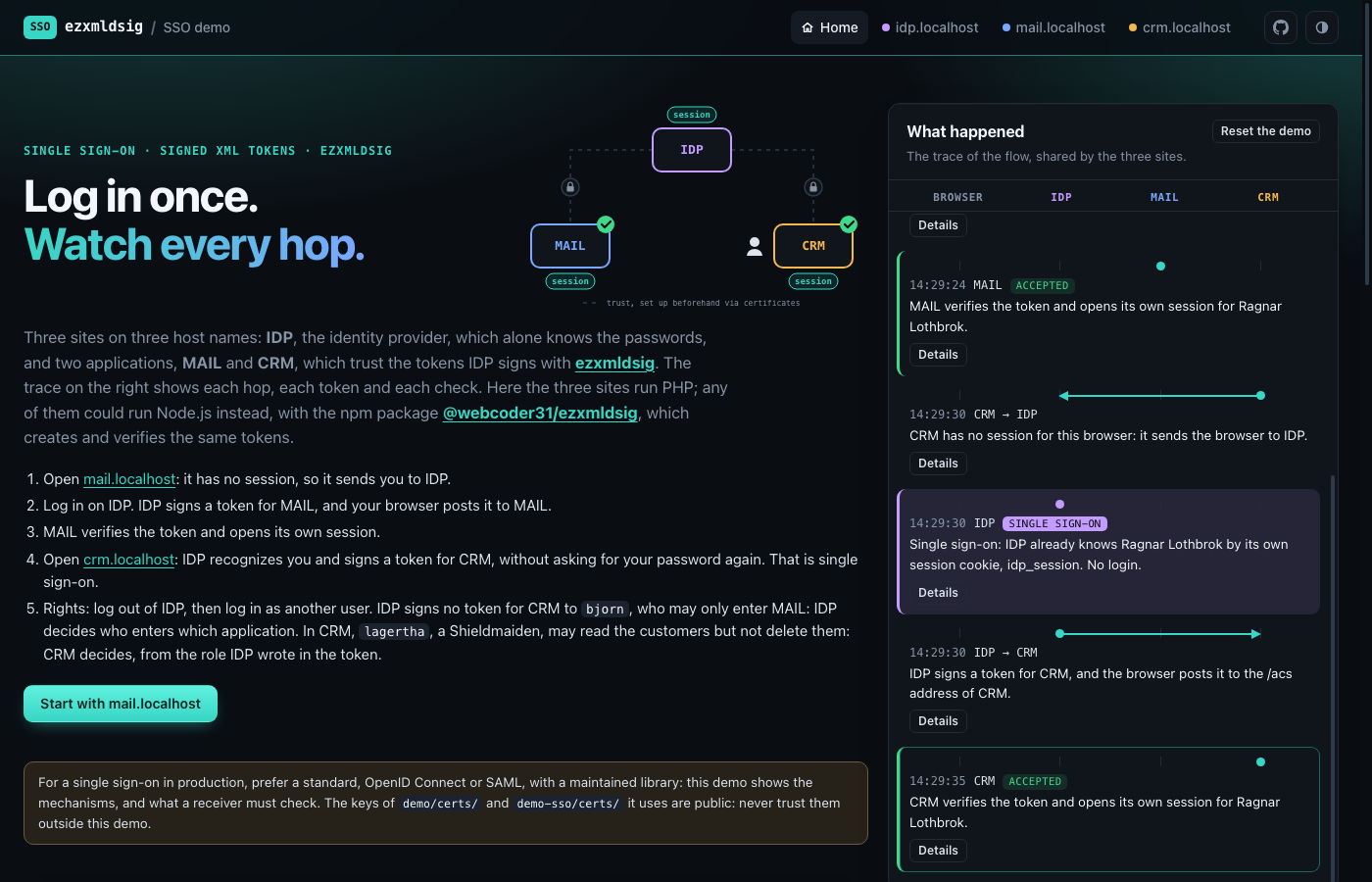
**The single sign-on demo, https://sso.wbcdr.dev/**: three sites on three host names, an identity provider, which alone knows the passwords, and two applications that open on the tokens it signs, one login for both. A trace shows each hop, each token and each check.
Differences with the PHP library
With the PHP library 1.2.1 or later, the tokens are the same, and so are the verdicts on them and the error messages, but in these cases:
- Certification authorities with name constraints are refused here, where OpenSSL enforces the constraints for the PHP library.
- Keys and certificates are given by the path of their file, as with the PHP library, or by their PEM content.
- Values of the data are read back as strings, or as a
Bufferwhen they are not UTF-8 text, where PHP gives strings of bytes; numbers are written asString()writes them, where PHP may round them. - Dates.
getCertValidFrom(),getCertValidTo()and the matching methods ofX509Certreturn dates in the format of the token timestamp, and take no format parameter. - Messages that name PHP types name JavaScript ones:
Its value must not be null or undefined.,Parameter must be an object.. - Not available:
getHTMLDump()andalterXML(), display and test helpers of the PHP library.
With the PHP library 1.2.0, three more cases differ, all defects of that version fixed in 1.2.1: upgrade it.
- It accepts a token whose signature is ECDSA (signed with an EC key) while it declares an RSA signature algorithm, which this library refuses, at creation (
The signing key is not an RSA key: the signature algorithms are RSA ones!) and at analysis (Token hash signature verification failed!). - With
base64Encode: false, it reads&in a value as the start of an entity reference:a&bis writtena&b, anda & bis lost. This library writes every value as text. - It stops on a PHP error on a certificate whose validity dates are in 2050 or later, which this library reads. Anyone can send a token signed with such a certificate to a receiver that runs PHP 1.2.0.
With the PHP library 2.1.0, for the seals, the seals are the same, and so are the verdicts on them and the error messages, but in these cases:
- Bytes and times. The files, the containers, the CRLs and the OCSP responses are
Uint8Arrayhere, strings of bytes in PHP. A time is aDatehere, where the PHP library takes a UNIX time (signingTime) and returns aDateTimeImmutable. - Limits of the reading of a container: the option
limits({ maxEntries, maxTotalSize }) here, the optionsmaxEntriesandmaxTotalSizein PHP. - Unicode. The names of the files are always compared in normalization form C here; the PHP library compares them so with the intl extension only, and as bytes without it.
Tests
Requirements: Node.js 22.12 or later, and a running Docker daemon for the tests of the interoperability with the PHP library, and for DSS (without Docker, these tests are skipped).
npm ci
npm test
npm test builds the library into dist/, checks the types of the sources and of the tests, and runs the tests with the test runner of Node.js. The tests take the cases of the tests of the PHP library, and compare each analysis of a token, sound or forged, with the analysis of the PHP library. The sample seals (test/helpers/samples.ts), the same as those of the tests of the PHP library, are verified by the PHP library too (test/seal/php.test.ts), with the verdict of this library.
The PHP library, version 2.1.0, runs in the official php:8.3-cli and php:7.4-cli Docker images, through bin/php-ezxmldsig (see its header). The first run clones it into test/.cache/ and installs its dependencies with Composer, in Docker. The tokens forged for the tests are altered, encrypted and signed again by the PHP library, not by the code under test. The tests also check that the PHP library emits no PHP message (warning, notice, deprecation) while it creates or analyzes a token. Without Docker, these tests are skipped, and the test runner says why; in continuous integration (CI=true), they fail instead.
The tests of the seals also have them validated by DSS (Digital Signature Service, the validator of the European Commission): npm test runs bin/test, which starts DSS with bin/dss (see their headers) on a Docker network of its own, gives the tests its URL in DSS_URL, and removes it at the end. DSS answers on a port of 127.0.0.1 that Docker picks, so that two runs do not collide; its image dss-demo:6.5.1 is built once from esig/dss-demonstrations (a Maven build, several minutes), and DSS takes some 40 seconds to start. DSS=0 npm test leaves it out, and its tests are then skipped, with the reason; so are they when the test runner runs alone, without DSS_URL. The arguments of npm test -- go to the test runner: npm test -- test/seal/dss.test.ts runs one file. The sample seals of test/helpers/samples.ts, the same as those of the tests of the PHP library, are validated by DSS in test/seal/dss.test.ts; the other tests of DSS are the cases proper to this library (a time-stamp of OpenSSL, the offline PKI, the revocation DSS fetches). In continuous integration, the jobs of Node.js 22 and 24 run without DSS (DSS=0), and the workflow .github/workflows/dss.yml runs the tests whose name holds DSS, with the image of DSS kept in the cache of GitHub Actions, and fails if any of them is skipped. It runs on each push and pull request, and before each publication on npm.
The certificates of test/fixtures/certs/ and test/fixtures/demo-certs/ are those of the PHP library; those of test/fixtures/trust/, one per case of the trust in a certificate, are generated by bin/gen-test-certs, in Docker. Their private keys are public: use them for the tests only (see the README of each directory).
What is checked, and by whom
Each library checks, for its tokens and for its seals:
- that it verifies what it creates;
- that the other library verifies what it creates;
- that third-party tools verify what it creates: xml-crypto and xml-encryption for the tokens, DSS (Digital Signature Service, the validator of the European Commission) for the seals;
- that it verifies what these tools create.
Each check belongs in the tests of the library itself, and runs in its continuous integration. Where each one is made:
| Check | Tokens of the PHP library | Tokens of the Node.js library | Seals of the PHP library | Seals of the Node.js library |
|---|---|---|---|---|
| 1. It verifies what it creates | tests and continuous integration of the PHP library | tests and continuous integration of the Node.js library | tests and continuous integration of the PHP library | tests and continuous integration of the Node.js library |
| 2. The other library verifies what it creates | tests and continuous integration of the PHP library, by the Node.js library 2.0.0 | tests and continuous integration of the Node.js library, by the PHP library 2.1.0 | tests and continuous integration of the PHP library, by the Node.js library 2.0.0 | tests and continuous integration of the Node.js library, by the PHP library 2.1.0 |
| 3. Third-party tools verify what it creates | tests and continuous integration of the PHP library | tests and continuous integration of the Node.js library | tests and continuous integration of the PHP library, by DSS | tests and continuous integration of the Node.js library |
| 4. It verifies what these tools create | tests and continuous integration of the PHP library | tests and continuous integration of the Node.js library | tests and continuous integration of the PHP library, on a seal made by DSS | tests and continuous integration of the Node.js library, on a seal made by DSS |
The tests of the PHP library run with bin/test, on a developer machine and in its continuous integration. The Node.js library depends on xml-crypto, which canonicalizes its XML: for its tokens, xml-crypto is not a checker wholly apart from the code under test.
Documentation
The documentation of the API is generated from the comments of the sources by TypeDoc into docs/, published by GitHub Pages: https://webcoder31.github.io/ezxmldsig-js/. Run npm run docs after changing a comment of an exported element, and commit docs/ with the code; the continuous integration checks that it is up to date. The pages load nothing from other servers.
Releasing a version
A version is published on npm by the workflow .github/workflows/publish.yml, when a release is published on GitHub; pushing to main, or pushing a tag, publishes nothing. npm trusts this workflow (trusted publishing): it publishes without any npm token, and npm adds the provenance of the package, which names the workflow and the commit the package was built from.
- Set the version, in
package.jsonandpackage-lock.json, without tag:npm version 1.2.3 --no-git-tag-version. - Describe it in
CHANGELOG.md, and regenerate the documentation (npm run docs): its title holds the version, and the continuous integration checks thatdocs/is up to date. - Commit and push, and wait for the continuous integration to pass, the seal tests validated by DSS included.
- Publish the release, whose tag must be
vfollowed by the version ofpackage.json:gh release create v1.2.3 --title 1.2.3 --notes-file <notes>. The workflow runs the seal tests validated by DSS, stops if the tag is another one, runs the tests, then publishes.
Security
To report a vulnerability, see SECURITY.md: report it privately, not in a public issue.
License
CeCILL-C, the license of both libraries.